NRPN: not that I think it is needed, but just out of curiosity. I suppose it is not supported, since there’s no mention in the manual or elsewhere, just double-checking.
Another question: I am currently working on a Kinotone Ribbons preset for the Electra One MkII controller, and want to fully utilize its advanced display options by creating custom text overlays to be displayed when tweaking various Ribbons knobs in various modes.
Could you please provide specific CC value boundaries for the non-continuous controls?
For example:
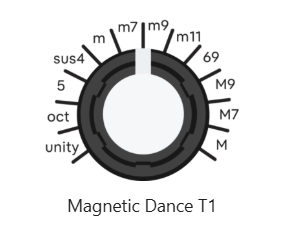
What are the exact MIDI CC value boundaries where the Rate in the Mag Dance touch mode switches from one to another? Like, Unity is from CC val 0 to CC val 10, Oct is from CC val 11 to CC val XX, etc.
I think I was able to make a good approximation using the calculator and a bit of guessing ))), but if you could just provide specific CCs you mapped mode change to, it would be awesome.
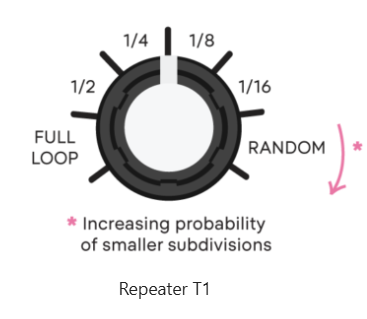
The same applies to:
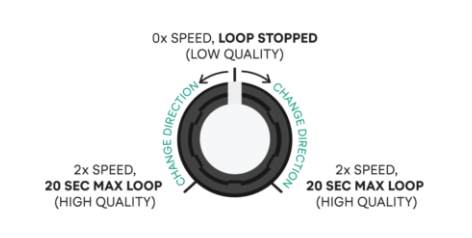
and this:
(here I would like to know the precise CCs for 1x speeds in both directions. What did you code for “9 o’clock” and “3 o’clock” normal speed positions? Also, is loop stop = CC val 63 or 64? Or both?
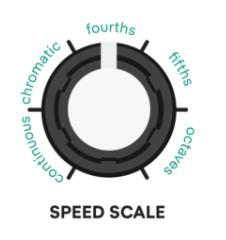
Also this (4-track looper Speed Scale):
Thank you in advance!
2 Likes
yes I’d also be interested to know these official values if it isn’t too much trouble! I just used my (undoubtedly flawed  ) ears to find the values in my TouchOSC template, but I’ll share my guesses below in case that’s helpful to anyone.
These are from the Lua scripts in my template (which you can download and tear apart here if you want to)-
– MODE 0: mag dance (T1)
if mode == 0 then
if midiVal <= 10 then displayText = “unity”
elseif midiVal <= 21 then displayText = “oct”
elseif midiVal <= 31 then displayText = “5”
elseif midiVal <= 42 then displayText = “sus4”
elseif midiVal <= 52 then displayText = “m”
elseif midiVal <= 63 then displayText = “m7”
elseif midiVal <= 74 then displayText = “m9”
elseif midiVal <= 84 then displayText = “m11”
elseif midiVal <= 95 then displayText = “6add9”
elseif midiVal <= 105 then displayText = “M9”
elseif midiVal <= 116 then displayText = “M7”
else displayText = “M”
– MODE 3: repeater (T1)
elseif mode == 3 then
if midiVal <= 20 then displayText = “full loop”
elseif midiVal <= 41 then displayText = “1/2”
elseif midiVal <= 63 then displayText = “1/4”
elseif midiVal <= 83 then displayText = “1/8”
elseif midiVal <= 105 then displayText = “1/16”
else displayText = “random”
-SPEED SCALE
if midiVal <= 25 then displayText = “CONT”
elseif midiVal <= 50 then displayText = “CHRO”
elseif midiVal <= 76 then displayText = “4ths”
elseif midiVal <= 101 then displayText = “5ths”
else displayText = “OCT"
and then I think I just left the SPEED knobs to be an implicit “continuous” 
1 Like
Yes, my values were pretty close to yours, maybe we deviated from each other by 1 CC step here and there.
Hope Kinotone team can chime in with the truth)))