Sorry if this has already been asked.I’m trying to control my Ribbons using a Launch Control 3 with the new 1.2 firmware, which allows the encoders to be set to relative mode. However, this doesn’t seem to affect the Ribbons. I assume this is normal behavior; is there any plan to support this mode in the future?
Thanks for the request. We have a Launch Control 3 and are familiar with its relative mode, but relative MIDI CC control is still a bit of a “Wild West,” with several different formats used by manufacturers. The LC3’s approach isn’t the standardized increment/decrement mechanism defined in MIDI.
I don’t think we’ll add it, because supporting one format would inevitably bring requests for the others, and we’d need to implement, test, and maintain that support across all three pedals.
In general, people have preferred using something like an LC3 or Faderfox EC4 for immediate access to the settings, then using the pedals’ own relative knob system for relative adjustments.
When you mention the non-standard increment/decrement behavior of the LC3, are you referring to the relative mode that Novation just added in the latest firmware (v1.2)?
It uses a convention called “binary offset,” where the encoder sends values on its assigned CC number: 65 means increase by one step, 63 means decrease by one step, and so on. The receiving device needs to be specifically configured to interpret those values as relative changes.
MIDI’s standardized increment/decrement mechanism works differently: you first select an RPN or NRPN parameter, then use CC96 to increment it or CC97 to decrement it. That’s a separate message scheme from what the LC3 uses for relative CC control.
So when I said “non-standard,” I meant there isn’t one universally defined relative interpretation for ordinary CC messages. Binary offset is an established convention used by multiple manufacturers, but other controllers use different conventions.
Thanks for providing this info. I recently got Ribbons (awesome!) and I saw this post today. After looking at midi controllers it seems the Novation Launch Control 3 is a good pick for the Ribbons? I’d be happy with an absolute mode which I believe is how LC3 works when not in the new relative mode.
Will this approach work via LC3 native absolute mode - set the LC3 up with a Custome Mode with the encoders directly mapped to the Direction, Volume, Speed, Speed Scale of each looper (using 12 of the encoders) so that I have one-knob-per-function control of the loopers via LC3?
I’m hoping/assuming the parameter values will persist (on both LC3 and Ribbons) when I switch the LC3 to a different Custom Mode to briefly control a different pedal/device on a different midi channel then change back to the Custom Mode for the Ribbons. I’ll probably use the remaining four encoders on LC3 for Touch 1, Touch 2, High Pass, Low Pass, but I will explore Ribbons and likely make more Custom Modes for the lofi goodness (Ribbons still very new to me and loving it).
Any input on this and advice on the LC3 is welcome. If there is another midi controller that pairs well with Ribbons please let me know. Bonus points if it does a good job of bouncing between Ribbons and Ghosts because I want to get Ghosts too!
The LC3 is a good fit for controlling Ribbons. You will need a DIN to TRS MIDI adapter like the one on our website and then you’ll have to reconfigure the MIDI CCs on the LC3 to match Ribbons. You can set up one page for all the tape controls and another page for the looper controls.
I have been plugging my LC3 into a rechargeable USB power bank to free up a power outlet.
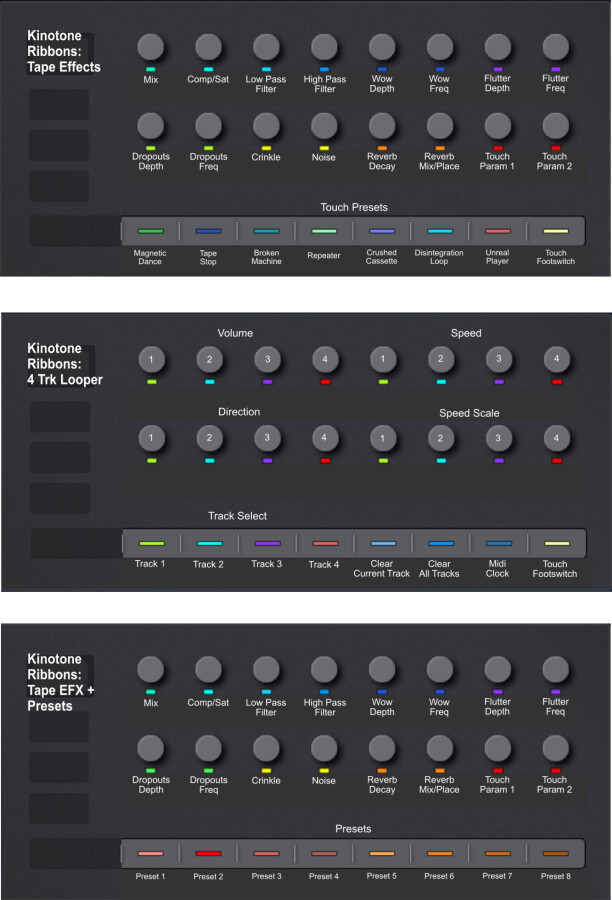
Hi. Thought I’d share how I’ve configured my Launch Control 3 to work with Ribbons.
As Jaak suggested, one page for Tape Effects and another for the Looper. I’ve added a third and fourth that duplicate the Tape Effects but adds Presets 1-8 and 9-16 to the encoders (as program changes). It’s only been a few days since getting the LC3 but it’s working well so far, and I imagine I’ll be tweaking it further. Here they are with labels added as guides until it becomes muscle memory.