Hi, need some help getting ribbons to work with midi. I have a Ribbons 2.0. I have 5 pedals on my board, controlled by midi, Ribbons is the only one not responding to anything. I have checked, or reset it to channel 1, I think I’m using the latest midi chart (bypass = cc17, also tried the old cc81) I tried different (rock board) TRS cables. All pedals are connected through a Disaster Area midi box 4, so using dip switches I can change from Type A, to B etc, tried them all). Ribbons just isn’t responding to anything. I also have an expression pedal connected to control the overal mix. I use a luminitefx graviton M2 midi controller.
Hoping to find some new insights here. Thanks
There are a few variables changing at once here, so I’d recommend simplifying the setup and checking one thing at a time.
A couple notes:
On Ribbons 2.0, bypass is CC81, not CC17. Make sure you are looking at the 2.0 CC chart - the older chart is not relevant.
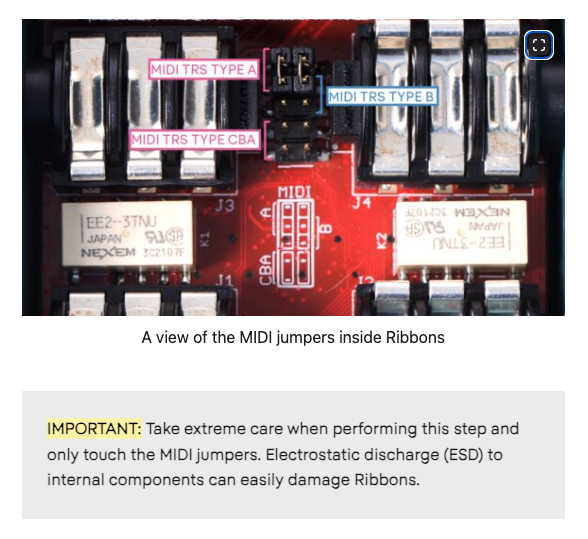
Check the placement of the internal MIDI jumpers. Ribbons supports TRS Type A, Type B, and Type CBA, but both jumpers need to be set correctly. This image is from an older Ribbons version but it more or less looks the same in the latest version of Ribbons.
Make sure you’re plugged into the MIDI input, not the CV/EXP jack.
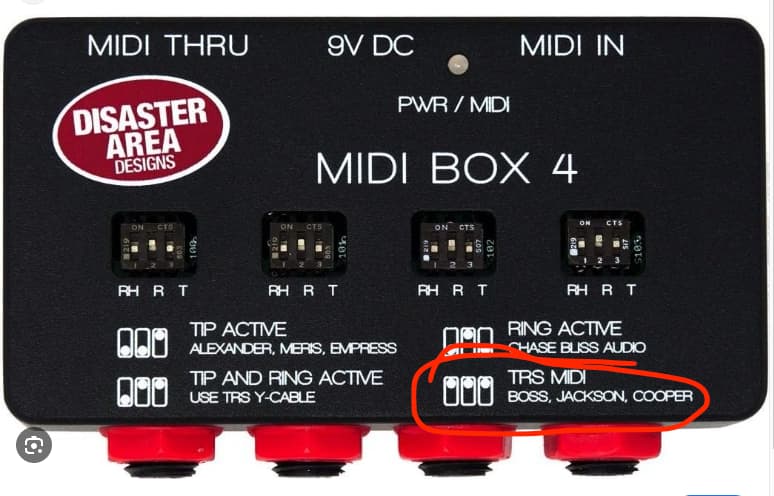
It doesn’t appear that the MIDI Box 4 has Type B MIDI, so not sure how you set it to that. You want the “TRS MIDI” setting with the jumpers on Ribbons in the A position, OR the “Ring Active” setting with the jumpers on Ribbons in the CBA position.
For the simplest test, set Ribbons to MIDI channel 1 (Reminder: you can’t have anything plugged into the CV/EXP input while entering the MIDI channel menu. Once you select your MIDI channel you must tap TOUCH to select your MIDI channel and save it to memory in the MIDI channel menu. Ribbons will reboot after pressing TOUCH), set both Ribbons and the Disaster Area box to the same MIDI type (TRS MIDI Type A), use a known-good TRS cable, and send CC81.
On Ribbons 2.0, CC81 values 0 - 64 = off and 65 - 127 = on.
2 Likes
Hello Jaak, thanks for your reply.
I’m at work now, but will check everything tomorrow and report back.
- Seems like I was first using the right midi chart, but after reading a few forum posts, got confused and started using the older chart. Thanks for clearing that out. I did try both though.
- I haven’t openend up the pedal yet, but I did read it is set to type A default, so that’s what I tried first. But I will double check tomorrow.
- Yes, I thought that ‘tip active’ was type A and ‘ring active’ would be type B, but seems I was mistaken. But I tried all the settings on de Disaster area and none of them worked. But possible by then I think I was only trying the old midi chart messages, that could explain it.
- I did perform a midi channel set on ribbons to channel 1 (unplugging the CV/EXP input, rebooting, holding both footswitches down, selecting first green led and confirming with touch switch)
- tried different rockboard cables
I see you circled the TRS midi setting on the Disaster area, so that means that one is supposed to be type A? That might explain my confusion.
I’ll check everything again en will report back.
Thanks again, take care
Gert
Ok Jaak,
It’s working. It was a simple combination of two confusions on my side.
First I used the right midi chart with the wrong connection type and then I used the wrong midi chart with the right connection type.
TRS midi on the disaster area is indeed type A. The Ribbons was setup just fine. And the chart with bypass = cc81 is the latest 2.0.
I’m fairly new to midi, but I’m learning a lot, fast 
Thanks again for your help.
Best regards, take care
Gert