I have a short delay (almost 1 sec) when trigger via midi the record in loop mode. I have the looper mode on my MC8pro enabled and for my mood pedal that works also as expected. Am I missing something here?
Are you sending MIDI clock, and is Ribbons listening for MIDI clock? That might explain the delay if it’s looking for the next downbeat.
Yes I send midi clock. Will Check Tomorrow if disabling the Click changes that behavior
1 Like
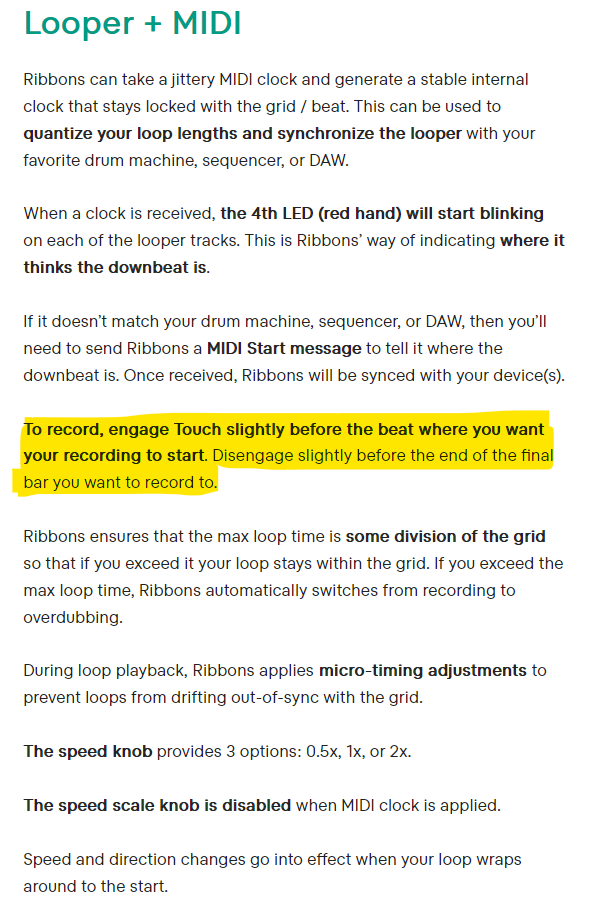
Sounds like you’re sending Ribbons a MIDI clock. You need to press the Touch button slightly before the downbeat to get it to start recording on the downbeat.
From the manual:
1 Like
yeh disable clk or send the clock ignore.
otherwise if using a morningstar pro series controller, make sure you’re using the looper mode for lowest button latency.
its a known requirement but also pretty sure theres some latency issues with their latest firmware as ive seen a few detailed complaints around it vs previous versions.
have been testing control of diff things on ribbons for a few weeks (not using looper mode), and sometimes ive noticed no real recording lag, othertimes ive noticed an unusable amount…
I disabled the midi clock but it didn’t change the behaviour. When I use the buttons on the Ribbons there is no delay, but triggered via Midi with the morningstar I have a delay. I am in Looper mode on the morningstar which normally solves the problem. Not sure what to do now 
Are you running midi direct from the Morningstar, or it is chained via MIDI thru with other devices before Ribbons? Midi signal latency can occur with some devices’ thru ports.
Is your Morningstar preset using PRESS as the action?
How are you assigning Looper Mode in the Morningstar? I have mine setup to enable looper mode when entering the BANK with looper switches. It disables it when leaving. Keep in mind that looper mode is not a set and forget state of Morningstar. You have to have it happen intentionally. IIRC, if you use a preset with a release or long-press function, it disables looper mode (I’m misremembering the states where it exits looper mode, but worth making sure you are definitely entering looper mode when you think you are. On the Pro6 or Pro8, there’s an indicator on one of the displays.)
I send my midi to a Midi Splitter → Midi Box → Ribbons. The MOOD also gets it’s signals from the Midi Box but doesn’t have any delay
I tried this yesterday using Ableton to send the MIDI CCs and didn’t experience any noticeable latency with and without MIDI clock.
I can take another look tomorrow but I feel like the issue might be on the transmission side. Maybe try reaching out to Morningstar support?
saw the latest morningstar pro series firmware fixes a specific delay issue with nested engage presets introduced a couple months ago and highlighted in a forum post.
bit stuck for time atm and havent been able to get it to re-occur when ive had some, but as i said i did notice the same issue, so yeh probably worth posting about with the midi monitor timestamp logs.
I updated to the new Firmware and I plugged in the Ribbons directly to my Omniport. No change apprently
I just tried it at my desk again using Ableton and our max for live device - the four track looper responds instantly to MIDI CC 80 when not synced to MIDI clock and always starts recording on the next clock cycle when synced to MIDI clock.

I tested again with the Chase Bliss MIDI box and got the same result.
What are your jumper settings set to inside Ribbons? When using the CBA MIDI box they should be set to type CBA - aka both jumpers in the leftmost position and you need a TRS to TRS cable (no crossed or clipped wires).
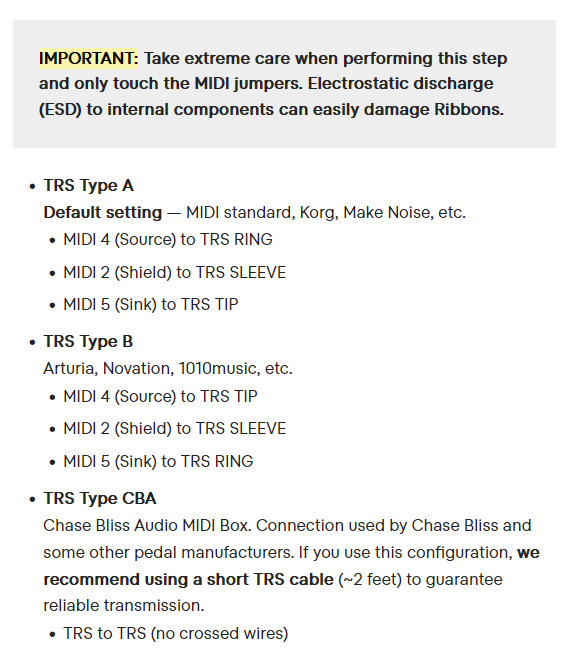
i think he might be using the morningstar midibox so just normal Type-A. but yeh direct from the omniports is not a good sign…
when i experienced it i also hadnt gotten round to using the morningstar looper mode, but the delay was way more than other midi looper devices id been testing previously also without using looper mode, so i did want to rule that out, but havent noticed the delay as bad since but haven’t had much time.
hopefully get some time on the w/e to further setup & test my ribbons 4track bank and see if it happens further.
The last idea I have is that you could try to mimic the MOOD’s configuration setup by adjusting the jumpers inside Ribbons to be type CBA. Since the MOOD seems to work well, that is the only difference between Ribbons and MOOD in your setup.
Maybe Morningstar has done some weird software implementation of the Type A configuration and that is leading to the latency.
Again - this sounds like a transmission issue. I feel pretty strongly that this isn’t an issue on our end. We scan for MIDI messages at a blazingly fast rate of 8kHz (125 microseconds) and respond to them immediately. In-fact, we respond to them faster than the footswitches, which require 20 milliseconds of debounce time.
2 Likes