yep, i definitely did
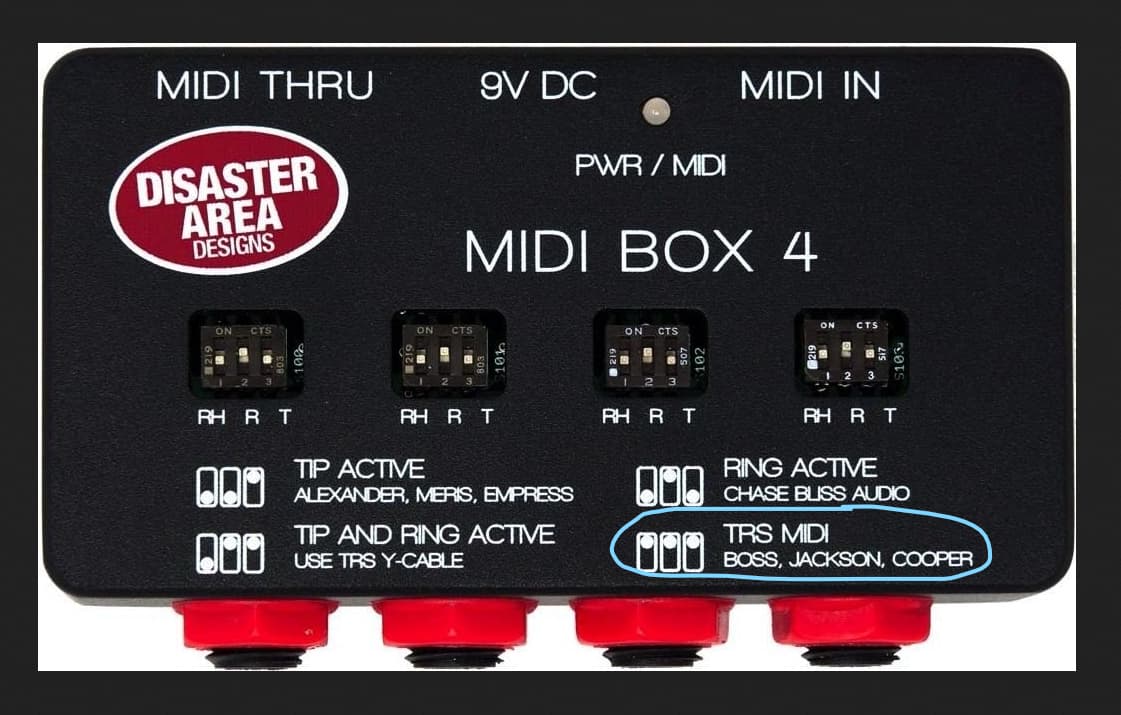
Is this the MIDI box you’re using? If so, Ghosts may only work with the TRS MIDI setting. Is this the setting you’re using?
2 Likes
OK, so if you’re positive you see the Mode LED as green while in MIDI channel selection mode, your Ghosts is on Ch1.
Now, the ES8 turn. I don’t own this device, so you’ll need to confirm that the MIDI CC command 81 with value 0 is sent to Ch1
Small clarification: if you just send the CC81 value 0, you need to first turn the Ghosts on via its footswitch, to be able to see the result of the MIDI command turning it back off.
i’m using 4.2, jaak; it has four pins, not three; it adds a TH pin to the set. i’ve tried TRS MIDI Type A, which is the one that now lists Boss and Jackson, and Type B.
right; it has been on when i’ve tried sending it the message with value 0. for lack of better idea, i tried just now putting it in bypass, then sending the message, but it didn’t turn on. i then took it out of bypass, same result.
Tell us the BOSS ES8 settings. If the MIDI Box is set to TRS, cables are good (you said Iridium works) and the Ghosts is on Ch1, then the issue is somewhere in the ES8 Programming.
Did you switch the outgoing MIDI Ch on the ES8 to Ch1?
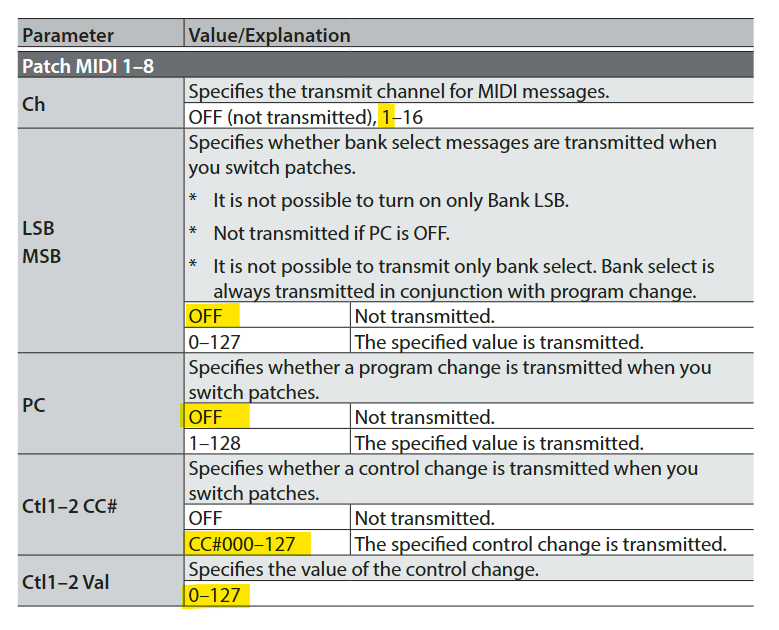
yup. here are the settings for this MIDI message on this patch; i confess to not knowing what some of them even are, i’m pretty new to MIDI, but again, the same settings worked for iridium, with just the changes in channel and CC#/value:
Ch 1
LSB Off
MSB Off
PC Off
Ct11 blank (no idea what this is)
CC# 081
Val 0
Transmit Auto (vs. manual, I believe)
Also wanna pause to thank you very much for all your time helping me with this, it’s much appreciated.
Couple thoughts:
-
You might not be sending any CC at all.
On the ES-8, the Patch MIDI CCs are sent from the Ctl1/Ctl2 slots (Ctl1 CC# + Ctl1 Val, and Ctl2 CC# + Ctl2 Val). If Ctl1 is blank/off and Ctl2 is also not set, then the ES-8 won’t transmit any CC, even if you see a CC# field elsewhere. If “Ct11 blank” is actually “Ctl1 CC# = OFF/blank”, that would explain it. From the ES-8 manual:
-
Val = 0 turns BYPASS off only when the current state is ON.
Even if CC 81 is being sent, value 0 is the “off” state. On Ghosts, BYPASS expects 0–64 = off and 65–127 = on, so try setting the value to 127 (or anything 65+). -
Patch MIDI with Transmit = AUTO only sends when the patch is recalled.
So make sure you actually switch to a different ES-8 patch and then back (and WRITE after editing), otherwise it’s easy to think it’s “sending” when it hasn’t re-transmitted yet.
1 Like
I think. CT11 is in fact CTL1.
This is one of the two CC messages ES8 can send per preset change in one of the Patch MIDI blocks.
Looks correct to me. But I have to admit, BOSS is not the most straight forward MIDI controller, to put it mildly)
Can you try the Assign instead of the Patch message?
Program one of the ES8 physical footswitches to send CC81 value 0 to Midi Ch1 via the Assign menu.
thanks very much, jaak. ‘Ct11’ is in fact Ctl 1, and it turns out it wasn’t ‘blank’ blank; it’s not a field where you change one value to another, just a sort of header that lets you know that it’s Ctl 1 that you’re configuring. So I’m relatively confident that wasn’t the issue.
To test out the two other points you brought up, i set up two patches to send CC81 messages to the pedal, one with a number below 65, the other with the value above it. then i clicked back and forth on the es-8 between the two patches, and toggled ghosts bypass on and off to see whether either patch would change either bypass state. the led never changed.
thanks for the suggestion, SV_huMMer; not sure how to do that yet, will look it up and report back
Just in case (it’s weird because you say Iridium works fine), but can you make sure ES8 MIDI Out/Trough port is configured as OUT, not THROUGH?
BTW, are you on FW 2 of the ES8?
oh sweet jesus christ
i’m so sorry to both of you; i should’ve known we weren’t thinking dumb enough, given the user in question.
i am apparently too used to pedals that have one jack sharing expression and MIDI functionality. i didn’t even notice that the MIDI jack is on the other side of the pedal.
am pleased and deeply ashamed to report the pedal is receiving MIDI messages. you know; when you’re plugged into the MIDI jack. can confirm that plugging into the expression jack will not transmit MIDI messages under any circumstances. just in case you needed that tested further.
deeply appreciate your both helping me get there. if either of you know of a secluded island where i can hide my face for a couple decades, please let me know.
2 Likes

2 Likes
(only kidding. glad you got it sorted!)
nope. someone should be punching me. maybe we could make it a fundraiser or something.
You see - I told you, MIDI is easy ) Modern pedals are hard. Four identical round holes, TRS stereo In, TRS Stereo Out, EXP/CV, MIDI… Go figure )
Glad it’s working for you.